


Encurage: Pill & Meds Tracker
4.86.00 Reviews
App Specs
- Version
- 2.4.10
- Updated On
- License
- Free
- Downloads
- 50,000+
- Developer
- Myrtus Enterprises LLC
- Categories
- Parenting
- Platform
- Android
Screenshots


 Analysis by AppCompare
I judge a medication app by a practical question: does it make a routine easier to follow without asking me to manage yet another complicated system? Encurage: Pill & Meds Tracker is a parenting-focused health app from Myrtus Enterprises LLC, and its appeal is the combination of dose reminders and a record of what has been taken. That pairing matters when one person is coordinating medicine for a child, helping another family member, or trying to keep their own schedule straight.
I’d look at it differently from a general calendar or a basic alarm. Those tools can prompt you at a chosen time, but they don’t necessarily give you a medication-specific history to check afterward. Encurage is more relevant when the recurring problem is not simply “remind me,” but “help me keep the routine and remember what happened.” If all you need is one daily alert, a standard phone alarm may be quicker and less involved.
Deciding whether a medication tracker fits
Before moving a household routine into an app, I’d consider who needs to see the reminders, how often the schedule changes, and whether a written record would be useful later. A tracker can make a repeated task more visible, but it still depends on people entering accurate information and responding to prompts. It should support a clinician’s directions, not decide what medicine someone should take or replace professional advice.
For a parent, a useful routine might be to enter the agreed schedule carefully, then check the log after a busy morning rather than relying on memory. If another caregiver is involved, the record can help the family talk through what was done and where handoffs are getting muddled. I would still make sure everyone understands the plan outside the app; a reminder is only helpful if the people involved know what it means.
The practical trade-off is setup. Adding each medicine and its timing takes attention at the beginning, especially when a child has several items or a schedule that varies. Taking a few minutes to review each entry against the instructions you already have is safer than rushing through setup. Barcode scanning can reduce some manual typing, but I’d verify the result rather than assume a scan has captured every detail correctly.
Getting Started with Encurage
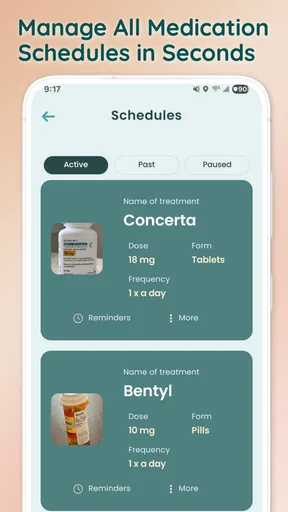
First impressions matter, and Encurage doesn't disappoint. The app's sleek and user-friendly interface makes it really easy to dive in. Setting it up is a breeze. You start by adding your medications, which you can do manually or by scanning the barcode. The app recognizes most medications, so you’re covered there.
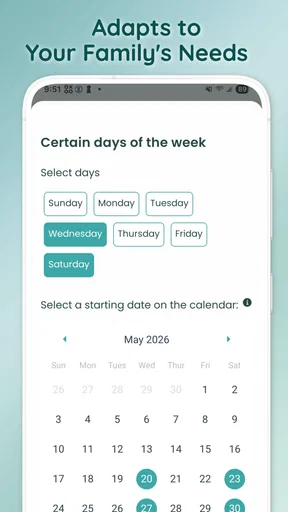
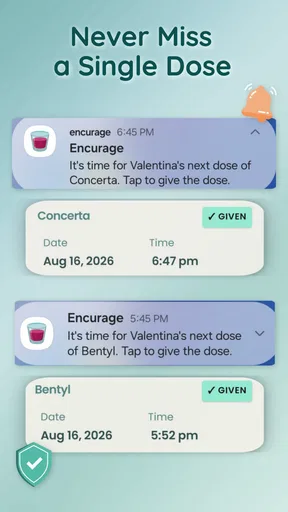
What I love most is the personalization. You can set reminders based on your schedule, so whether you're a morning person or a night owl, Encurage has got you covered. The reminders are gentle but persistent, giving you just the right nudge to stay on track.
Worth Reading Before You Choose

EA SPORTS FC Mobile 26 Is a Bigger Football Game, but It Takes Time

Flipboard Shows What News Apps Must Do Beyond the Feed

Switching to Android Auto Means Rethinking Your Driving Routine

Google Calendar Makes a Crowded Week Easier to Manage

Ludo King Makes the Most of the Minutes Between Plans

Baby Panda World Brings Quick Play to Modern Phones, but Its Game Library Feels Busy
Features That Stand Out
One word: customization. Encurage allows you to customize everything from the reminder tones to the frequency and timing of alerts. This is perfect if you’re like me and need a little flexibility in your routine.
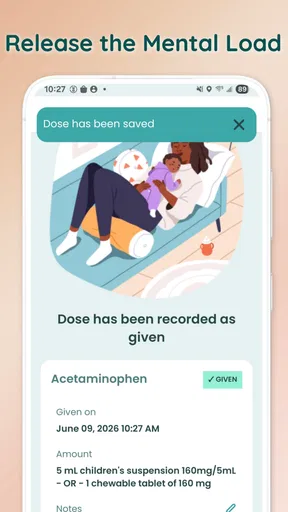
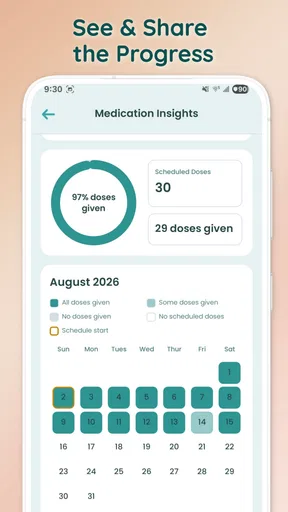
Another highlight is the medication log. It's like having a little personal assistant that tracks all your meds. You can check your history to see what you've taken and when. Plus, it provides insightful stats that can be really handy for your next doctor’s visit.
The app also offers integration with other health apps. If you're already tracking your fitness or diet elsewhere, Encurage fits right into your digital health ecosystem. It's great to see how your medication routine aligns with your overall health goals.
Putting reminders and the log to work
A reminder system works best when its timing matches a real decision point in the day. For example, setting a prompt around an established breakfast routine may be more useful than choosing an arbitrary hour that often falls during the school run. If a dose is associated with a particular daily habit, I’d use that predictable moment to make the alert easier to act on.
The log has a different job from the alert: it helps answer the “did that happen?” question afterward. In a realistic household scenario, one caregiver handles the morning and another takes over later. Checking the record during the handoff can reduce guesswork and avoid relying on a hurried text or a fading memory. It’s a small workflow change, but it is where a tracker can be more useful than a row of alarms.
I would also treat the history as a conversation aid, not a medical conclusion. If a clinician asks how consistently a routine has been followed, a record may help you describe it more clearly. It cannot explain why a dose was missed or establish that a treatment is working, so context still matters. A brief note to yourself about an unusual day may be useful outside the app if the distinction is important.
One non-obvious tip is to keep the first setup deliberately simple. Add the medicines and schedules that matter now, confirm the reminders behave as expected, and only then decide whether extra customization improves the routine. Too many alerts can become background noise, especially when several family members receive prompts at similar times. I’d rather have a small number of meaningful reminders than a crowded notification stream that everyone learns to dismiss.
Where other options may be better
Compared with a paper chart on the refrigerator, Encurage offers timed prompts and a digital history, while paper can be easier for a whole household to see at a glance without opening a phone. A chart may suit a simple routine or a home where several people need shared visibility. The app makes more sense when reminders and checking a past record are the main pain points.
A calendar or the phone’s built-in alarm can be enough for someone with one stable daily dose. Those options are familiar and require little medication-specific setup, but they may not provide the same focused log described here. On the other hand, someone seeking a broader health-record system or a tool built around a particular clinical workflow should compare those needs carefully rather than assume a reminder app covers them.
Encurage is also not a substitute for a person who can supervise a child or confirm a dose in a high-risk situation. A notification can be missed, a phone can be elsewhere, and an alert cannot resolve uncertainty about instructions. When reliable oversight is essential, a direct caregiver handoff or advice from a healthcare professional is more appropriate than trusting an app alone.
For families with changing schedules, the main question is how much maintenance the routine will require. If timings change, I’d update the plan as soon as the family has clear instructions, then check that the next alerts reflect the change. If caregivers cannot agree on one accurate schedule, sorting that out first is more important than adding more reminders.
Cost, compatibility, and the effort of switching
Encurage is free to download, with in-app purchases ranging from $4.99 to $129.99 per item. I’d start by seeing whether its basic workflow solves the actual problem before paying for anything. The range is broad enough that I would check the purchase details in the app and consider whether an optional feature is genuinely useful to my household, rather than treating payment as necessary for medication tracking.
The app is rated for Everyone and has a 4.8 average from around 126 ratings, with over 50,000 installs. It was released on February 5, 2025, and version 2.4.10 requires operating system 7.0 or later. Those details offer a quick sense of its reach and compatibility, but they don’t tell me whether the workflow suits a particular family; trying the setup against a real routine is the more meaningful test.
Switching from alarms or a paper list has a modest but real cost: medicines and schedules need to be entered, and anyone who relies on the routine needs to know where the current plan lives. I’d avoid deleting the old reminder system the moment I install the app. Run both briefly while checking that entries and notifications make sense, then retire the duplicate only when the new process feels dependable. That reduces the risk of a gap during the transition.
A few practical questions are worth answering before relying on it day to day. Can a caregiver understand the schedule at a glance? Are the alerts arriving at moments when someone can respond? Does the log make it easy to resolve uncertainty after a handoff? I’d test those points with the actual people involved, because an interface that feels obvious to one parent may not be obvious to a grandparent or a babysitter.
Why You’ll Love Using It
Let’s talk about peace of mind. There's something incredibly reassuring about knowing you won't miss a dose. Encurage not only helps you remember your meds, but it also reduces the anxiety that comes with managing them.
The app's design is intuitive. Even if you're not tech-savvy, you’ll find it straightforward to navigate. The color-coded reminders and easy-to-understand interface make it accessible for everyone.
And if you're like me and occasionally forget your phone, Encurage has got you covered with smartwatch compatibility. This is a lifesaver when you’re on the go and need a quick reminder.
- Easy setup with barcode scanning
- Customizable reminders and alerts
- Comprehensive medication log
- Integration with other health apps
- Smartwatch compatibility
Those strengths are most valuable when they solve a specific recurring problem: remembering, recording, and coordinating. They are less compelling if a family already has a reliable shared routine, or if notifications tend to be ignored. I’d also be cautious about treating smartwatch compatibility as a backup plan for every situation; a wearable can make a prompt more convenient, but it does not replace checking the schedule or confirming that a dose was actually taken.
Who I’d recommend it to
I’d consider Encurage for a parent managing repeated medication reminders, an adult who wants a clearer dose history, or a household where caregivers need a more dependable handoff than “I think I gave it.” Its strongest case is a routine with enough moving parts that memory and a basic alarm no longer feel adequate, but not so much complexity that a specialized clinical system is required.
I’d skip it if the routine is already simple and dependable, if the person taking medicine does not use a compatible device comfortably, or if the family needs a confirmed shared system that the app’s described workflow does not establish. I would also choose direct professional guidance over app-based organization whenever instructions are unclear, a schedule is changing for medical reasons, or someone needs supervision rather than a reminder.
Final Thoughts
In a world where we're all trying to juggle a million things at once, Encurage: Pill & Meds Tracker is a breath of fresh air. It's more than just a reminder app; it's a comprehensive tool that gives you control over your health routine.
So, if you're tired of sticky notes or unreliable phone alarms, give Encurage a shot. It's like having a personal health assistant right in your pocket, making sure you never miss a beat—or a pill. Happy tracking!
My recommendation is to begin with one real, recurring routine rather than moving every household task into the app at once. Set it up carefully, use the log during a handoff, and see whether the reminders reduce uncertainty without adding notification clutter. If they do, Encurage earns its place in the routine; if a calendar, visible chart, or direct caregiver check works better, there’s no reason to switch just for the sake of using an app.
Pros
- User-friendly interface for easy tracking.
- Customizable reminders for timely alerts.
- Comprehensive medication database included.
- Secure data backup for peace of mind.
- Supports multiple user profiles.
Cons
- Limited features in free version.
- No integration with fitness apps.
- Occasional notification delays.
- Requires a stable internet connection.
- Lacks advanced health analytics.
FAQs for Encurage: Pill & Meds Tracker
What is Encurage: Pill & Meds Tracker and how does it work?
Encurage: Pill & Meds Tracker is a comprehensive app designed to assist users in managing their medication schedules. It allows users to set reminders for their doses, track their medication history, and keep a detailed log of their health conditions. The app offers notifications to ensure you never miss a dose, fostering better health management.
Is Encurage easy to use for someone who isn't tech-savvy?
Absolutely! Encurage is designed with user-friendliness in mind. The interface is intuitive, with straightforward navigation that makes setting up medication schedules simple. Even users who aren't familiar with technology will find it easy to input their medication details and track their progress with ease.
Does Encurage offer any features for monitoring medication adherence?
Yes, Encurage includes features to help monitor and improve medication adherence. Users can receive alerts when it's time to take their medication and track their adherence over time. The app provides insights into your medication-taking patterns, helping you stay informed and consistent with your regimen.
Can I use Encurage to track medications for more than one person?
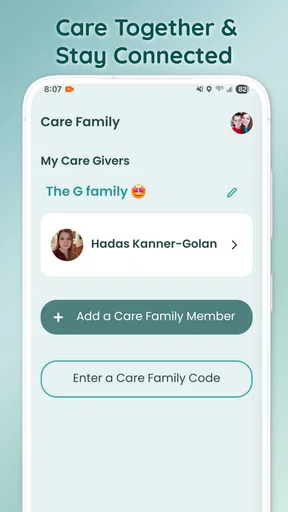
Encurage allows users to manage multiple profiles, making it ideal for caregivers or families managing medications for several individuals. Each profile can have its own separate medication schedule, reminders, and logs, ensuring personalized management for everyone involved.
Is my personal and medical information safe with Encurage?
Encurage places a high priority on user privacy and data security. The app employs encryption and other security measures to protect your personal and medical information. Users can trust that their data is handled with the utmost care, adhering to privacy standards and regulations.


